← Back to selected work

Field notes / Open-source contribution / 2026

Atelier

A clearer studio for
complex assets.

Interface design and practical workflow improvements for an existing Marvel Rivals modding application.

My role
UI design & development contributor
Original application
Noobmaster & Clownfetus
Tools & approach
Material 3 · JavaScript · Python
GitHub · Codex · Claude
Project status
Open source · Ongoing contributions
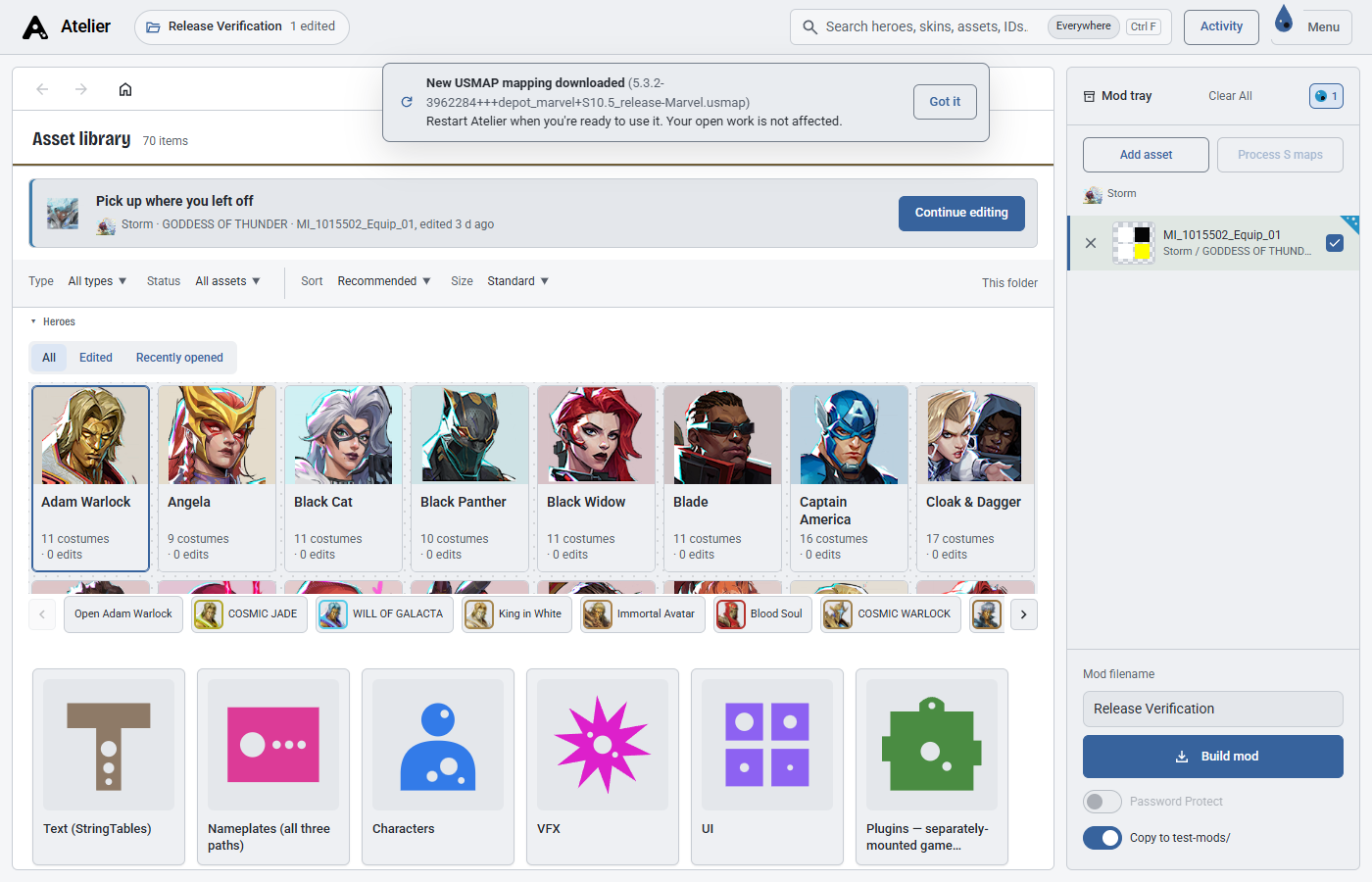
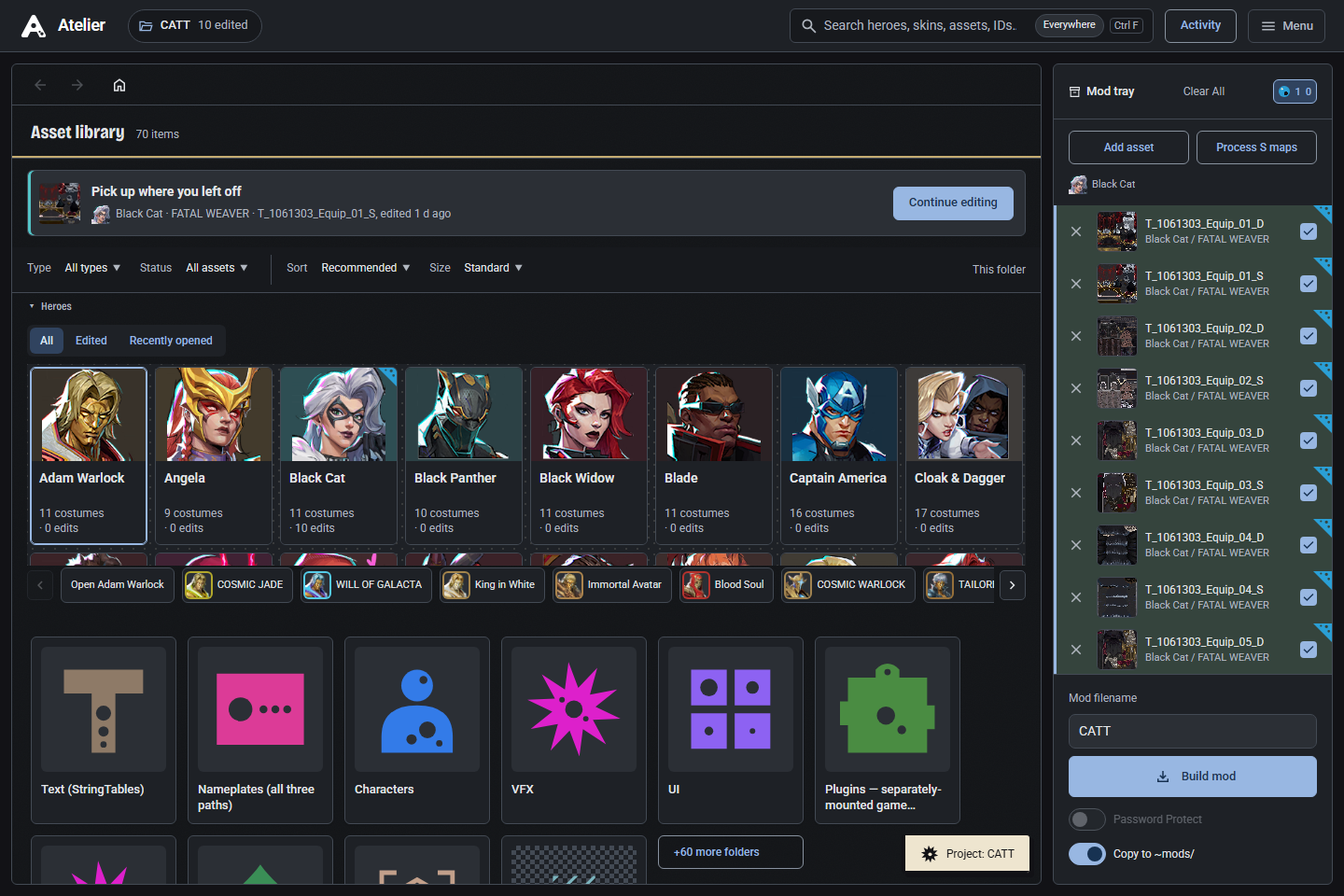
Atelier’s dark interface with hero browsing, search, category cards and a mod tray
Asset library / The current integrated interfaceReal application screenshot · Captured 26 October 2026

01 / Context

Helping artists find their way through technical work.

Atelier is an open-source desktop application for browsing, editing and exporting Marvel Rivals assets. It brings textures, material parameters, models and mod-building workflows into one workspace.

My starting point was an application that already worked, with an established creator, toolchain and community. I contributed a clearer visual system and improvements to the steps between finding an asset, making an edit and understanding what will be exported.

I am a contributor, not the founder or sole developer. The original application and its underlying modding pipeline are the work of Noobmaster, Clownfetus and the project’s other contributors.
02 / Interface direction

From asset browser
to creative workspace.

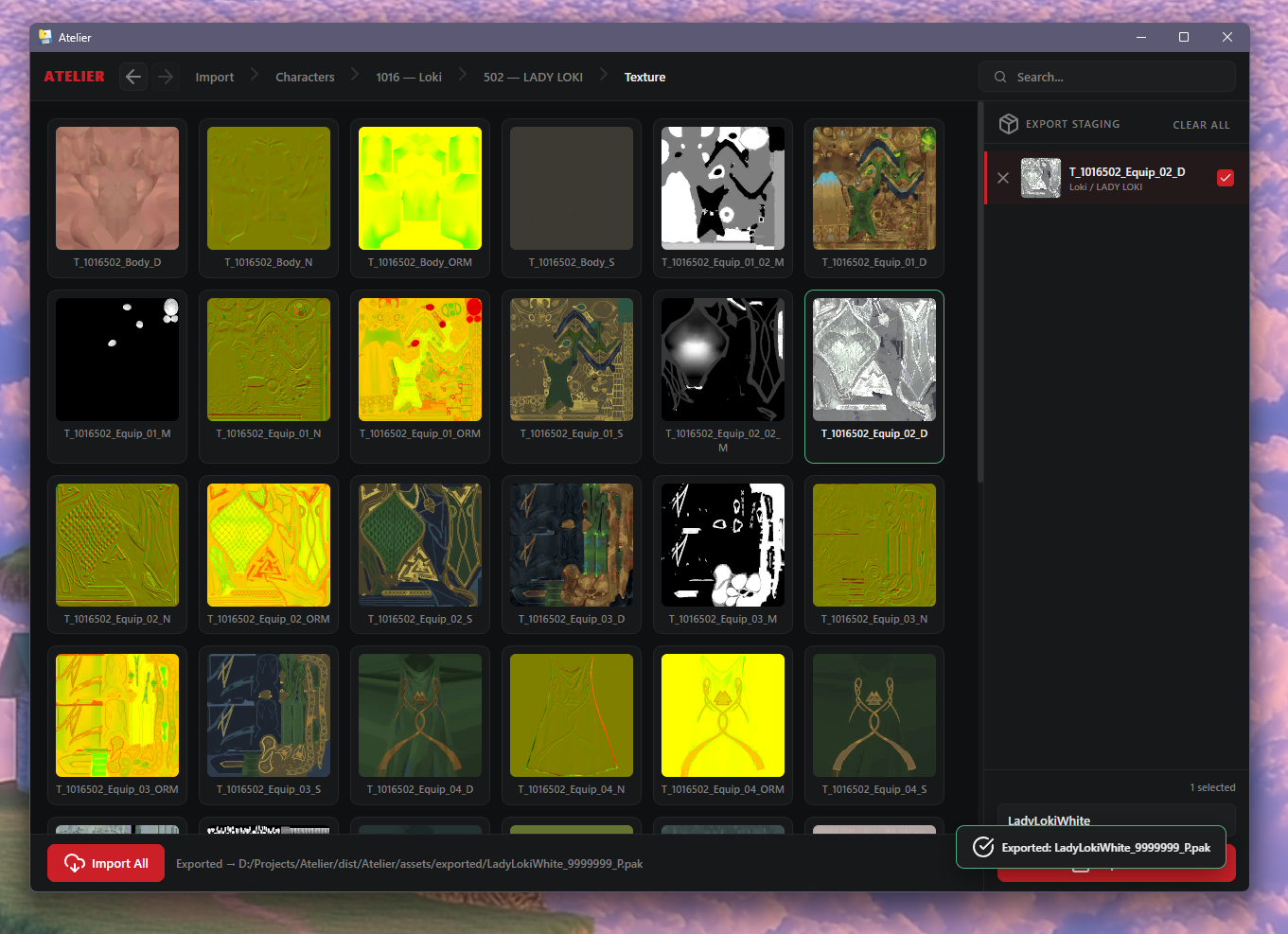
The Material 3-inspired redesign introduces a more consistent hierarchy: readable controls, framed previews, clearer navigation and coordinated light, dark and system themes. The existing application stack and project format stay intact.

Before / Original interface

The original Atelier interface: a dense texture grid, breadcrumb navigation and export staging
Original project screenshot, from the source preceding my interface contribution.

After / Integrated redesign

The redesigned light interface with grouped navigation, asset filters and a clearer mod tray
Current light theme. Different project content is shown; the comparison illustrates interface structure.

Images are real application captures from the project’s repository. The current interface combines my contributions with upstream work. See the original redesign pull request ↗

03 / My contributions

Design decisions carried
through to implementation.

I

A shared interface language

Material 3-inspired themes, local typography, category icons and more deliberate preview framing. Search, filtering and keyboard navigation make the asset library easier to explore. Motion has reduced-motion and static alternatives.

Interface redesign · PR #2 ↗
II

Texture & material workflows

Grouped material controls, saved/original comparisons and clearer unsaved states. Follow-up work lets a material slot use a custom image, with practical refinements to texture imports, custom asset paths and export workflows.

Custom texture assignment · PR #11 ↗
III

Safer steps, clearer feedback

Reviewing edits before export, guarding unsaved work and protecting newer edits while a save finishes. Recoverable jobs and activity feedback make interrupted or incomplete operations easier to understand.

Jobs, bulk editing & themes · PR #3 ↗
IV

Practical 3D problem-solving

Connected Assembly View, UV inspection and improvements around Blender handoffs and model-load errors. These changes help connect what an artist sees on a model to its materials, textures and editing tools.

Connected Assembly View · PR #31 ↗

04 / Making relationships visible

From a model surface
to the asset behind it.

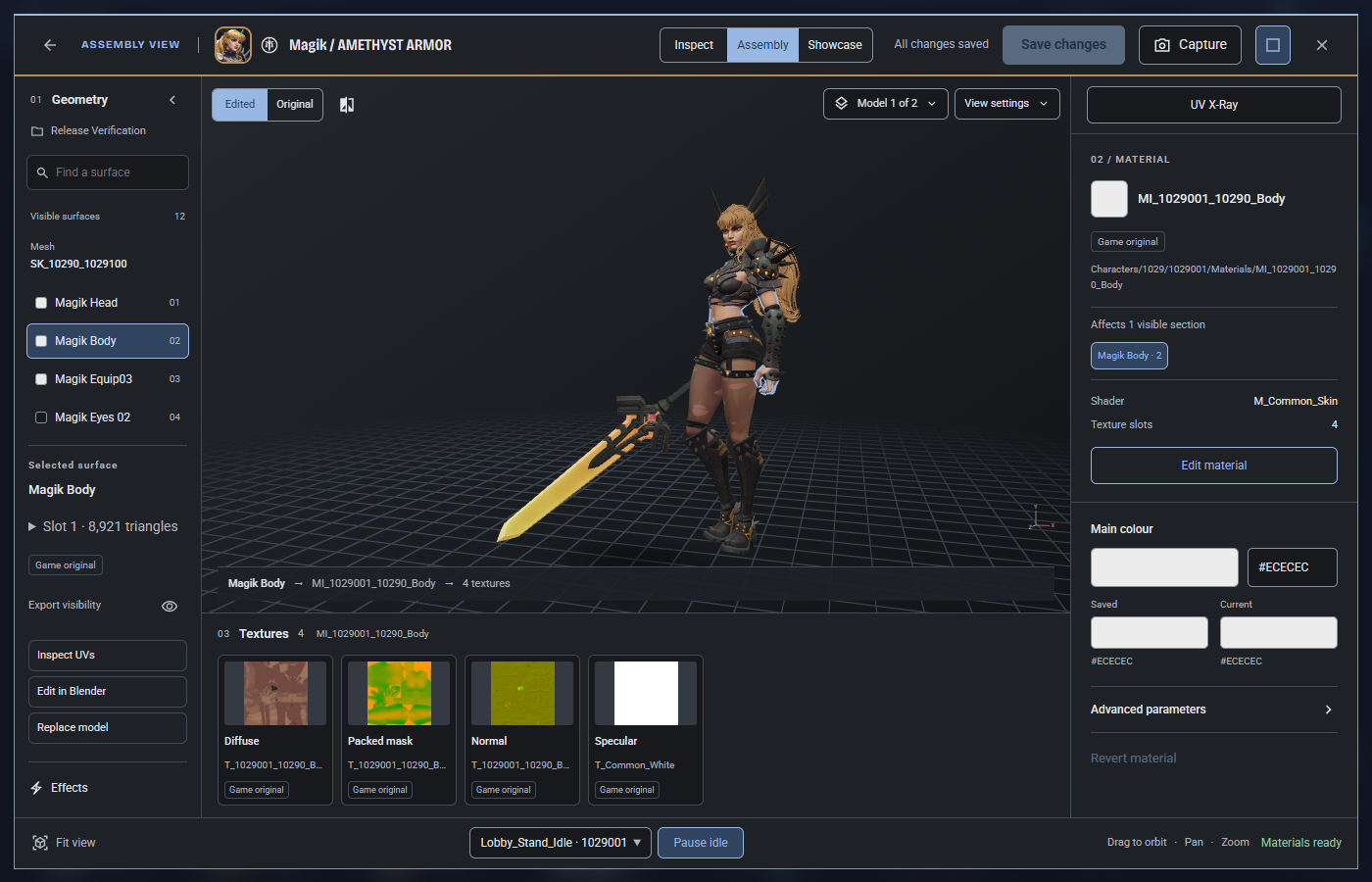
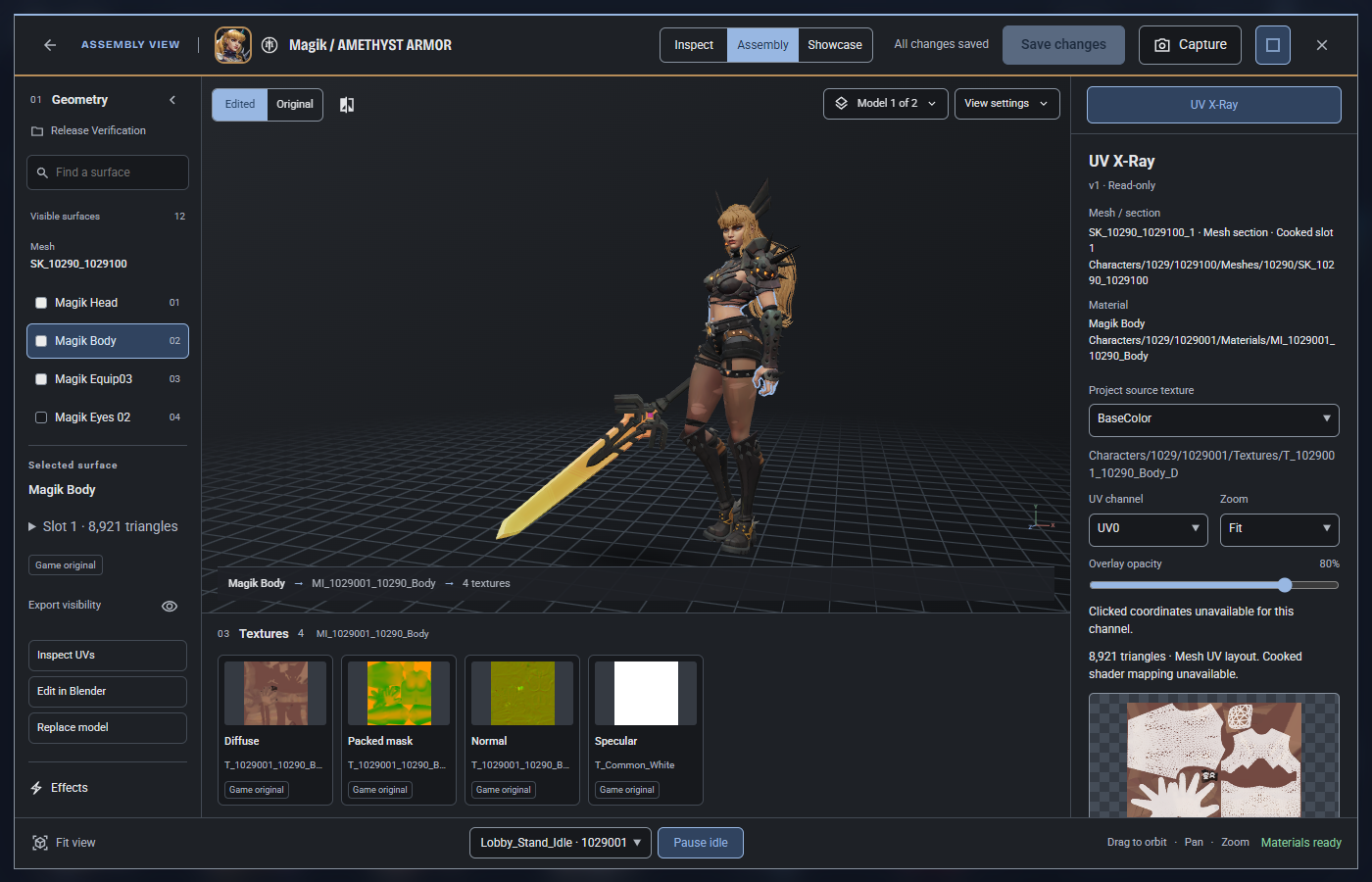
Assembly View connects geometry, materials and texture slots in one workspace. UV X-Ray adds read-only inspection and exact-resolution layout export for supported decoded UVs. Both build on Atelier’s existing model viewer and asset systems.

Assembly View with a selected Magik mesh section linked to its material and diffuse, mask, normal and specular textures
Assembly View / The selected surface connects to its material and texture cards.
Atelier UV X-Ray showing a mesh section’s UV wireframe over its source texture
UV X-Ray / Read-only texture and UV inspection.

Work within the real constraints.

Preserving existing UVs, asset references and saved edits matters as much as the interface. The work includes debugging, checking actual asset relationships and explaining unsupported cases rather than presenting approximations as exact results.

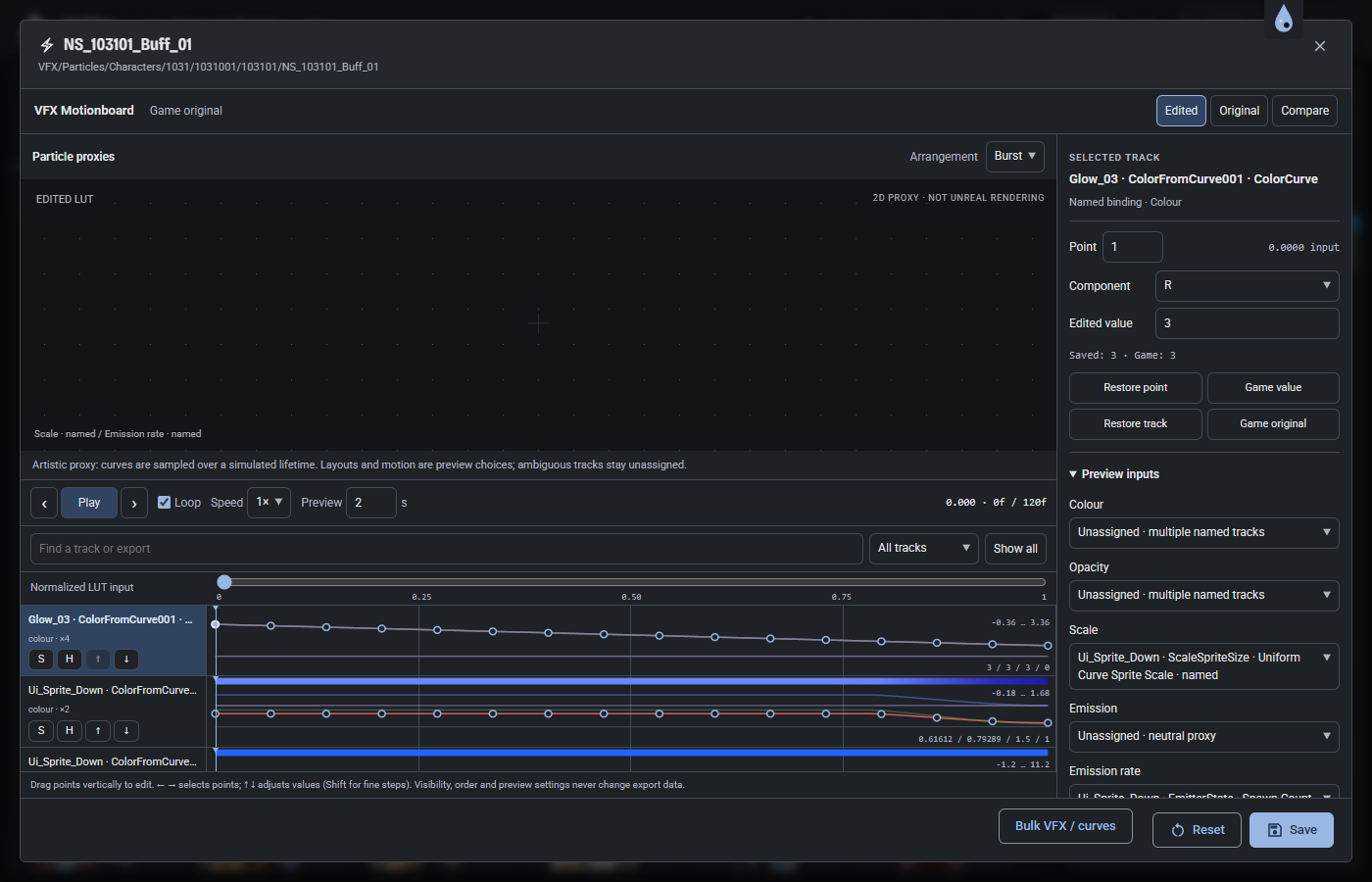
UV inspection is limited by the decoded data available; the VFX Motionboard uses lightweight previews rather than reproducing Unreal’s full simulation. In-game appearance still needs checking.

UV inspection contribution · PR #30 ↗
Atelier VFX Motionboard with editable gradient tracks, curves, timing controls and a preview
VFX Motionboard / A visual editing workspace for supported colour and value tracks. PR #29 ↗

05 / Iteration & collaboration

AI-assisted.
Directed and reviewed.

I use Codex and Claude to explore implementation ideas, prototype interfaces and work through technical problems. The design direction, selection and refinement remain part of my practice: checking the result against the intended workflow, reviewing behaviour and iterating when something fails.

Changes were developed through GitHub pull requests and maintainer review. Clownfetus merged the Material 3 redesign on 15 October 2026; later contributions extend the interface and asset workflows. The pull requests make the scope, implementation and verification limits inspectable.

This is independent and collaborative project experience, developed through practical use and feedback, rather than a claim to have built the entire application.

06 / What this work demonstrates

An artist’s eye.
A practical approach to tools.

Visual hierarchy, interface design and technical problem-solving meet in a tool people can inspect and use. My contributions are integrated into the original project, with continued iteration on the workflows behind the artwork.